
|
ProTrekkr v2.8.3 PRE 5 by Neural [web]
[nfo]
|
||||||||
|---|---|---|---|---|---|---|---|---|
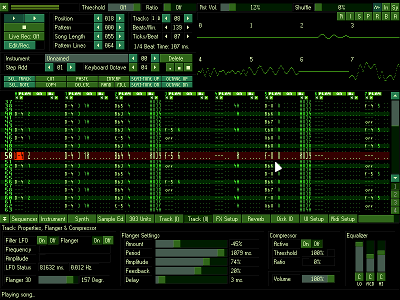
|
|
|||||||
|
popularity : 82% |
|||||||
alltime top: #325 |
|
|||||||
added on the 2008-04-17 21:06:37 by hitchhikr  |
||||||||


popularity helper
comments
первый нахЪ! =))
rulez added on the 2008-04-17 21:11:17 by RRROAR 
Awesome.

Coolness! :) Also comes with pretty cool example tunes. Too bad it can't load normal protracker modules though ;)

Hmmm, a new tracker. Pas mal, pas mal... Respect for keeping spirit alive.
What about somekindda AHX tracker next time (I wish there was one =) ?.
What about somekindda AHX tracker next time (I wish there was one =) ?.

Nice idea, look forward to checking it properly.
Sim - a Windows version of HivelyTracker is on the way from Vampire^TZT. It'll load and save AHX modules, needless to say. When a bit more work is done, we'll set up a site and make it known.
Sim - a Windows version of HivelyTracker is on the way from Vampire^TZT. It'll load and save AHX modules, needless to say. When a bit more work is done, we'll set up a site and make it known.

I will probably rules this before long, but is this related to the Renoise predecessor Noisetrekker?


Quote:
ProTrekkr (formerly known as NoiseTrekker 2 by Juan Antonio Arguelles Rius aka Arguru) is an attempt
to create a tracker program targetting the creation of electronic music for small sized intros & games
by combining a synthesizer as well as a traditional plain samples tracker.
nicely fuxx0red layout :D
Fantastic, the quality is wicked too! :D
syphus: cheers dude for this cool info!
great stuff

Tracker!

@Syphus
"Set up a site"? Why set up a site? Hivelytracker has a site. Its still my project.
"Set up a site"? Why set up a site? Hivelytracker has a site. Its still my project.

In living memory of Arguru.


I have been able to test it before and it's really a good move from the coder.
It's amazing to see how it packs your song.
Long live to Arguru.
It's amazing to see how it packs your song.
Long live to Arguru.

Alright mate, sorry - "put an announcement on a site"/"create a page on the Hively site concerning this Windows editor"/"<whatever semantic and semiotic means of ideological transmission are preferred for making details of this project-based-on-a-project known to people who show an interest>". Do you think I meant to offend you? Really?
i don't know much about the wonders of trackers but megakudos for continuing arguru's works :)

I see a 303!

From what I have seen so far, it's quite nice.

Coolness! Nice work. *grabs his own copy*
another hitchhikr-quality-code.! :)
Thanx,feels good.! ..and has some Features i always wanted in the original-Protracker...like the Sequencer.! :)
somehow i know i´ll feel dumb later for asking,but.:
how to convert a .ptp into a header-file.? ( .h )
i guess i could write my own converter,but as i´ve got a lot to do and think there is a converter already somewhere out there,please link me beautiful.! THANX :)
ALL ThumbZ up.!
...and an Extra-Thumb for Arguru.!
Thanx,feels good.! ..and has some Features i always wanted in the original-Protracker...like the Sequencer.! :)
somehow i know i´ll feel dumb later for asking,but.:
how to convert a .ptp into a header-file.? ( .h )
i guess i could write my own converter,but as i´ve got a lot to do and think there is a converter already somewhere out there,please link me beautiful.! THANX :)
ALL ThumbZ up.!
...and an Extra-Thumb for Arguru.!

Quote:
how to convert a .ptp into a header-file.? ( .h )
For example: bin2c

Im still waiting for that future composer tracker ;)

Have played around with it from the beginning but didn't finish a track yet. The Tracker just rules.

Huh, nice! I'll try it :)
Chromag, I'm waiting a song from you! ;)
Chromag, I'm waiting a song from you! ;)

Manwe: Likewise!!
Can we have an OSX-port please?!

gloom: the osx port is planed yes, i'll have to check that with pontscho soon.
cOcOOn: i suggest you to use nasm or masm with vstudio and a custom build script to generate a .obj directly.
cOcOOn: i suggest you to use nasm or masm with vstudio and a custom build script to generate a .obj directly.
:)
thanX,misioslaw...its working already :) (and me moron was googlin for it for about 2-3 hours without finding it earlier...should have coded it myself...lol...but am too tired-out.!)
hitch.: Thanx.!! that tool will definitely find its way into one of our next prodZ.! Tracking is the best way to make music ;)
your suggestion sounds reasonably and logic...!
will try that when our momentaneous projeCt is done,hehe.! :)
hitch.: Thanx.!! that tool will definitely find its way into one of our next prodZ.! Tracking is the best way to make music ;)
your suggestion sounds reasonably and logic...!
will try that when our momentaneous projeCt is done,hehe.! :)
This tracker rules! Great work done.
Arguru legacy forever!
Arguru legacy forever!

Tracker is good, but WHY no import MOD/XM/MIDI/Anything?
so great to see a new tracker around ;-)

misioslaw: It can import old .ntk (NoiseTrekker) modules!
Anyway, importing MODs, at least, would be great!
Anyway, importing MODs, at least, would be great!
midi files import is definitely on it's way, i don't see the point in importing .mod or .xm.
Great trackers and useful tool.
In living memory of Arguru.
In living memory of Arguru.

I don't think I will ever seriously use this, but it looks cute and the example tunes sound convincing enough.
So, thumb up for renoise's little step-brother.
So, thumb up for renoise's little step-brother.

hitchhikr: Sometimes, I start my music on a real Amiga (old PT2.3a, you know) and then (if I decide to make a multichannel or a mp3s with VSTi and so) I just import it on psycle (another great tool based on Arguru code, by the way) and finally I add those fancy VSTi instruments.
Thats the only reason (to me) for the need of MOD importing.
But, I don't want compaint about things like that! The tracker is very good! (except for the disturbing lack of an icon in the caption bar of the window).
Will you make a linux port? What about release the sources of the .lib? It would be good for intro coders who like to use commands in the sequencer for synchro purposes.
Thanks for this great new tracker!
Thats the only reason (to me) for the need of MOD importing.
But, I don't want compaint about things like that! The tracker is very good! (except for the disturbing lack of an icon in the caption bar of the window).
Will you make a linux port? What about release the sources of the .lib? It would be good for intro coders who like to use commands in the sequencer for synchro purposes.
Thanks for this great new tracker!
Thumb up for a new tracker! Tried it a bit, too.
Just downloaded this product. I think it's great because I absolutely loved Noisetrekker.
I've also noticed that 4 out of the 6 demo songs included are mine, bizzarely! They don't play quite right yet, Hitchhikr (as you may already be aware).
To find out how they sounded originally in Noisetrekker, visit my site ('Money' and 'Round-a-bout' are available to play as mp3's, too):
http://music.rhino.googlepages.com/
Keep up the good work!!!
I've also noticed that 4 out of the 6 demo songs included are mine, bizzarely! They don't play quite right yet, Hitchhikr (as you may already be aware).
To find out how they sounded originally in Noisetrekker, visit my site ('Money' and 'Round-a-bout' are available to play as mp3's, too):
http://music.rhino.googlepages.com/
Keep up the good work!!!

ham:
At most i could only import the notes and 1 or 2 effects + the samples anyway.
Which icon ? The maximize one ?
I don't think there'll be a linux. I'll probably adapt the replay to the psp's media engine
and see if it can be ported to macosx.
As for synchro purposes there's getrow & getpos functions.
The sourcecode will surely be available at some point in time after some clean up.
rhino: yes i'm aware that they don't sound exactly the same as they did before, it's because i modified & improved the synth also some bugs made it sound like it did.
And i forgot to mention you in the thanks section of the manual, that's fixed :].
At most i could only import the notes and 1 or 2 effects + the samples anyway.
Quote:
But, I don't want compaint about things like that! The tracker is very good! (except for the disturbing lack of an icon in the caption bar of the window).
Which icon ? The maximize one ?
Quote:
Will you make a linux port? What about release the sources of the .lib? It would be good for intro coders who like to use commands in the sequencer for synchro purposes.
I don't think there'll be a linux. I'll probably adapt the replay to the psp's media engine
and see if it can be ported to macosx.
As for synchro purposes there's getrow & getpos functions.
The sourcecode will surely be available at some point in time after some clean up.
rhino: yes i'm aware that they don't sound exactly the same as they did before, it's because i modified & improved the synth also some bugs made it sound like it did.
And i forgot to mention you in the thanks section of the manual, that's fixed :].
Hitchhikr: Ok, I assumed it would be a modification in the synth. If it'll never sound the same as the original, then fair enough, it's not a problem. I may update the songs in Protrekkr to reflect more how I intended them to sound.
And thanks for your thanks ;)
And thanks for your thanks ;)
very nice!

looks like a nice enough little tracker, but im curious about it's intended use for 64ks - as all the example songs are massive when packed. i'd be interested to hear what it can do with a 10-15k total footprint for the song and player, because thats what v2 (or my own synth, indeed) would take.

hitchhikr:
Good. Hurry up and don't clean it too much! It could not be worse than the old asm sources of the first protracker replayers. ;)
That would be fine!
Of course, perfect import between too different trackers it's not possible.
Who needs maximize having full screen?
I'm referring to the program icon... I mean, that little image or logotype that appears near the name of the window, in the upper left corner.
A white rectangle it's not cool for a v1.4 release, man! ;)
Quote:
As for synchro purposes there's getrow & getpos functions.
The sourcecode will surely be available at some point in time after some clean up.
Good. Hurry up and don't clean it too much! It could not be worse than the old asm sources of the first protracker replayers. ;)
Quote:
At most i could only import the notes and 1 or 2 effects + the samples anyway.
That would be fine!
Of course, perfect import between too different trackers it's not possible.
Quote:
Which icon ? The maximize one ?
Who needs maximize having full screen?
I'm referring to the program icon... I mean, that little image or logotype that appears near the name of the window, in the upper left corner.
A white rectangle it's not cool for a v1.4 release, man! ;)
ooooh my god :o first i was thinking like... yeah, another (noisetrekker based) tracker but later i realised it was made for 64k intros and stuff! we have been making minifmod hacks to add effects and features but it seems protrekkr has it all already!

Very nice!

Smash: i don't have any modules specifically crafted for that purpose yet, here is a fast hack of one of them:
http://pagesperso-orange.fr/franck.charlet/temp/PtkTest.zip
Good to know anyway coz i thought they could be a tad bigger than that, what i'll eventually do is to provide the replay while the tracker would generate .h of constants to strip unused parts of the code off.
http://pagesperso-orange.fr/franck.charlet/temp/PtkTest.zip
Good to know anyway coz i thought they could be a tad bigger than that, what i'll eventually do is to provide the replay while the tracker would generate .h of constants to strip unused parts of the code off.
Gotta learn this one...

I want to be Mac OS X betatester of this beautie :)

Felt like shit when I tried it last year at least

I second Rez.. and here is the thumb :)
Nice!

yep

oh, vista aero support please!
what smash said, and after the reply from hitch ... thumb up.

I'm 3rd for Mac OS X testing! :)
Very interesting.
Although, I keep seeing a lot of this behavior where the foreground text and other stuff disappear. The tracker continues to work but it's a bit hard to navigate. ;) Also, it seems to often crash here when loading samples.
I would also like to see channel scopes to get a better overview of what's going on.
Although, I keep seeing a lot of this behavior where the foreground text and other stuff disappear. The tracker continues to work but it's a bit hard to navigate. ;) Also, it seems to often crash here when loading samples.
I would also like to see channel scopes to get a better overview of what's going on.

Send me these discourteous samples to hitchhikr at australia.edu
Aright, i updated the archive so now you have channels scopes in the tracker.
Send me those faulty samples.
Send me those faulty samples.
forgot the thumb
Great stuff.

Blimey, that was fast! (Though the scopes seem very, _very_ sensitive atm.) Digging up some problematic samples as I write..
Hehe! Now the program looks better. :)
Like this!

wow, i tested protrekkr also on a older pc (Intel Celeron / 500mhz) and it runs smooth (eats around 60 - 70% CPU)
linux port please

Oki i've fixed the .wav samples issue and added the .mod import (no miracles), fixed some bugs here and there, check the history.txt.
Bloody hell! Nice!! Now give us a 64k using this! :)


This is some nice stuff.. :)

hitchhikr:
Thanks for the ".mod import" feature!
There are bugs related with the full-screen mode... you probably are aware of that. The colours could turn reddish if you use Alt+Tab while working in full-screen.
Sometimes, (well, it only happens to me one time) the screen becomes totally black... may I suggest to add a shortcut key for switch between window and full-screen modes?
A new version each day? ;)
Thanks for the ".mod import" feature!
There are bugs related with the full-screen mode... you probably are aware of that. The colours could turn reddish if you use Alt+Tab while working in full-screen.
Sometimes, (well, it only happens to me one time) the screen becomes totally black... may I suggest to add a shortcut key for switch between window and full-screen modes?
A new version each day? ;)

Do not forget to make your .nfo file up-to-date too =).
fat!

I fixed the alt+tab bug (and some others). I uploaded a new version which contains the replay routine source code.
Makes me wanna track again.. :)

Wow! Downloaded two days ago, and already a new version!
Channel scope is a great new feature, but why the master left-right scope disappeared? i think it's also useful.
The vertical scale of the scope seems too sensitive (visual clipping)...
Channel scope is a great new feature, but why the master left-right scope disappeared? i think it's also useful.
The vertical scale of the scope seems too sensitive (visual clipping)...
untel: Look again :]
hitchhikr: oops, au temps pour moi... :-|
I added it after you made your post.
hitchhikr:
I supose that soon there will be vumeters too. :)
I supose that soon there will be vumeters too. :)
I have the same interface bug that Raina had (text keeps disappearing)
Otherwise, it's a pretty cool tracker ;)
Otherwise, it's a pretty cool tracker ;)

vertical

Many thanks for mod import.
good work ! this one is a usefull addition for the synthetic tunes world

manbearpig (or raina): you'll have to describe exactly what you're doing to obtain this crazy result because i can't reproduce that bug here.
Well, too bad double-thumbup doesn't exist :)
I'm REALLY dying for a Mac OSX port of that great tracker !!!
I'm REALLY dying for a Mac OSX port of that great tracker !!!
great tracker, thanks a lot for this one
Dear hitchhikr, I found some clicks in sound (while no visual clipping), they appears on any OSC volume, any filter amount, etc. Can't find a reason. Could you please check this modue? Thank you!
Dear Manwe, i thought that crackling sound was coming out of my lousy head phones but it was coming from the lousy flanger :]
Download the archive again it should be fixed.
Download the archive again it should be fixed.
hitchhikr:
I've tried to find what caused that bug... it turned out that I got it when the 303 tab was open.
About the bug in detail: everithyig runs fine until I open the 303 tab then some text labels start to blink and the disappear. Then if I click a clickable text it disappears (it seems like that the bug doesn't have effect on the stop button and labels I can't click on)
I have a dual-core computer with geforce 6600 and XP sp2 running on it
I hope this information will help :)
I've tried to find what caused that bug... it turned out that I got it when the 303 tab was open.
About the bug in detail: everithyig runs fine until I open the 303 tab then some text labels start to blink and the disappear. Then if I click a clickable text it disappears (it seems like that the bug doesn't have effect on the stop button and labels I can't click on)
I have a dual-core computer with geforce 6600 and XP sp2 running on it
I hope this information will help :)
oh, and one more thing... all these things happen only while I play a song.

manbearpig: i've updated the archive with a new version, hopefully this will fix the problem.
... And ofcourse I'll thumb this up.

OSX pleeeeeeeeeease! :D
I can't wait to play with that machine of madness 8D
I can't wait to play with that machine of madness 8D
Sometimes crash when loading tune while playing another:
Unhandled exception at 0x00414468 in ProTrekkr.exe: 0xC0000005: Access violation reading location 0x024467cc.
Unhandled exception at 0x00414468 in ProTrekkr.exe: 0xC0000005: Access violation reading location 0x024467cc.
Thank you, hitchhikr!
The question about ENV = OSC pitch. It works in +/- 12 semitones, but what if I need more (to make a bassdrum from sine wave)? I use ENV1 and ENV2, both set to OSC1 pitch, but there is no summary effect.
Also, it looks like oscilator phase did not resets for every new note (so, every bassdrum sounds different).
The question about ENV = OSC pitch. It works in +/- 12 semitones, but what if I need more (to make a bassdrum from sine wave)? I use ENV1 and ENV2, both set to OSC1 pitch, but there is no summary effect.
Also, it looks like oscilator phase did not resets for every new note (so, every bassdrum sounds different).
manwe: it wasn't crafted for that, use waveforms for drums (you can also use wavs with the synth).
misioslaw: updated, maybe it'll work now.
misioslaw: updated, maybe it'll work now.
A new version twice a day! That's really impressive.
Thanks again for this great soft.
Here is a second thumb up for you:
Thanks again for this great soft.
Here is a second thumb up for you:
rez: use parallels or boot camp ffs :p
Quote:
rez: use parallels or boot camp ffs :p
I'm afraid booting Windows on my iBook G4 is not a good idea :D
Auto update? :)
Why is keyjazzing disabled for MIDI in? I can only use the MIDI keyboard when Edit/Rec is on.
Version 1245.2f will be out next week.
raina: oops, should be fixed now, but keep in mind that this isn't the main purpose of ptk so the midi support will stay minimal. What about the disappearing font bug, is it fixed ?
great work as always, extra for fast updates
for fast updates
hitch... you got my vote ! :) was nice to spend some time in find bugs and give some ideas :) good work mate !

Rulez.
The #ifdef for UnpackTrueSpeech seems incorrect in Samples_Unpack.cpp though?
Shouldn't it be #ifdef PTK_TRUESPEECH instead???
The #ifdef for UnpackTrueSpeech seems incorrect in Samples_Unpack.cpp though?
Shouldn't it be #ifdef PTK_TRUESPEECH instead???

Definitely, i updated fixed that and uploaded a new archive.
hitchhikr - it'd be nice to see '0' as a Step Add option :) And if it's not too picky, it'd also be nice to have click+hold buttons to increment values. I mean rather than lots of little clicks. I don't explain that fabulously well, but you know what I mean.
Having fun playing with it now - cheers :)
Having fun playing with it now - cheers :)
syphus: v1.8 release with step add 0 implemented + some major changes.
Yet another Unhandled exception at 0x004164A1 Access violation
MOVSX EDX,WORD PTR DS:[ECX+EAX*2+4]
(probably in sample proc)
Sometimes and only when loading mods while playing another.
btw: Why loading new mod not make stop playing? in *.ptk stops before plays new tune.
MOVSX EDX,WORD PTR DS:[ECX+EAX*2+4]
(probably in sample proc)
Sometimes and only when loading mods while playing another.
btw: Why loading new mod not make stop playing? in *.ptk stops before plays new tune.
Because i forgot ? Archive updated and the problem should be fixed now, is it ?
Sure, problem solved ! :-)
propspropsprops!
ho and PIIIIIIINK noise.
LOVE IT!

For the memory of Arguru.

no new version today? what's going on? :D
Will it feature some more effects columns?
It's not that I am a musician, but since you can tweak the "knobs" in the effects column I think it would make sense. Yes/No?
It's not that I am a musician, but since you can tweak the "knobs" in the effects column I think it would make sense. Yes/No?
nula: if you download the archive again you'll see it was modified today, but it's still bearing the same version number :]
xernobyl: if you're talking about the 303 effects they can be placed everywhere on any track so all of them can be modified at the same time.
xernobyl: if you're talking about the 303 effects they can be placed everywhere on any track so all of them can be modified at the same time.
fresh!

This seems very nice indeed. I'd prefer an OSX version too, though.

great tool!

Still not OSX version :'(
Too bad that software run only on the crapiest OS ever made...
Too bad that software run only on the crapiest OS ever made...
Linux? Never tried it on linux. It also runs on Windows, you know? ;)
Too bad still not using python as coding language. :(

with wine it says: "XML (2): unable to open file"
and then hangs with 100% cpu-load. maybe its easy to fix? :)
and then hangs with 100% cpu-load. maybe its easy to fix? :)

I want a linux port!

I planed to release the next version together with the complete source code anyway.
Neat! Is there some specific license for the replayer code?

Nope.

AMAZING, great work, it sounds fantastic!!! but.... what about a mac release? ;)

This is really nice! I'm starting to use it ;)

Very nice ! :)

For the programmers: I suggest to add the autosaving feature to this cool program! Because, as any program, it may crash, as my one did.
eek it crashes on start up on my machine :(

This program @ me it's crashed when I was in the middle of the "creative catalessicomusical" moment... I've lost my work!
Where did it crash, can you reproduce the bug (if that's a bug) ?
Well... I was reproducing the mod with some samples & synths together (in different tracks), and while I was playing the pattern, in some row, the program's crashed.
I haven't did the debug, because I've clicked on debug when the program tought me to send the error to Microsoft (quite unuseful), and nothing's appeared.
Anyway, that was a crash, not a bug. It's for this I've tought you to add the autosaving in intervals of minutes.
I haven't did the debug, because I've clicked on debug when the program tought me to send the error to Microsoft (quite unuseful), and nothing's appeared.
Anyway, that was a crash, not a bug. It's for this I've tought you to add the autosaving in intervals of minutes.
ahhh yuk! good tracker but fuck vc++! sux.

songname won't be saved after reload a mod.
btw. would be nice to split up load sample, load instrument, load song in 3 directoryboxes... cauz..after change the HD to sample-directory, the song will be saved in this directory... need to much time to change all the time the hds.. :)
btw. would be nice to split up load sample, load instrument, load song in 3 directoryboxes... cauz..after change the HD to sample-directory, the song will be saved in this directory... need to much time to change all the time the hds.. :)
I love the way this trackers set up but it crashes at random on my computer. which i find extremely annoying when I've been working for 6 hours on a song.

Seems like a decent framework for a intro/demo-tracker, but there are plenty of things which could be improved.. Eg. the approach used with the interface makes the initial learning curve slightly steep. Hopefully there'll be some updates and/or fixes as well, I surely can help by suggesting some :).
For instance, unpacked modules don't seem to flush empty patterns on save. So, if you accidentally click on a wrong digit while switching patterns this pattern is permanently added to the song file resulting in a bloated file. If saved packed, the size doesn't change, so the thing _does_ work on that end at least ;)
I get the program crashing at random f.ex. if editing a sample while pattern playback is on.
For instance, unpacked modules don't seem to flush empty patterns on save. So, if you accidentally click on a wrong digit while switching patterns this pattern is permanently added to the song file resulting in a bloated file. If saved packed, the size doesn't change, so the thing _does_ work on that end at least ;)
I get the program crashing at random f.ex. if editing a sample while pattern playback is on.

This is awesome. I can't stop playing with it. Thank you!
manbearpig: I had the same problem with text labels disappearing. I worked around it by replacing the SDL.dll with the latest one from SDL.org, no more problems.
manbearpig: I had the same problem with text labels disappearing. I worked around it by replacing the SDL.dll with the latest one from SDL.org, no more problems.

* libSDL.org
forgot to vote


wait, this is SDL? Is it SDL for audio as well as gfx? If so, don't suppose you want to let me do an OS4 port? ;-)
wow this is totally awesome. Is there someone to contact if I think I have found a bug?

I'll release an updated version tomorrow hopefully.
v1.82:
- Samples were trashed during replay when a segment of a waveform was selected in the samples editor.
- Added a scrollbar to the samples editor.
- All effects should now work on stock waveforms too (like pitch bend, volume etc).
- ADSRs values extended.
- Better multi channels allocations.
- Fixed a bug in note retrigger effect (0xe).
- Fixed all the presets and instruments.
- The tracker now uses 3 separates directories for the Modules/Instruments & Presets.
- Fixed a small issue with the numeric keypad slash key.
- Now send a note off when a channel has been turned off.
- Fixed the glider effect (0x5).
- MingW replay is now included in distribution.
- Source code released.
- Samples were trashed during replay when a segment of a waveform was selected in the samples editor.
- Added a scrollbar to the samples editor.
- All effects should now work on stock waveforms too (like pitch bend, volume etc).
- ADSRs values extended.
- Better multi channels allocations.
- Fixed a bug in note retrigger effect (0xe).
- Fixed all the presets and instruments.
- The tracker now uses 3 separates directories for the Modules/Instruments & Presets.
- Fixed a small issue with the numeric keypad slash key.
- Now send a note off when a channel has been turned off.
- Fixed the glider effect (0x5).
- MingW replay is now included in distribution.
- Source code released.
Thanks! You're the best! :)
linux port would be nice too
Nice tool and releasing source code for tools like these just rules. So a double thumb up :)
I'll do an ongoing Linux port if the source is put in a VCS, I can't be bothered downloading each new version and manually merging it.
Cool you released the source :)

is one of the synth oscillators out of tune in this release? Looks like oscillator 2?
mmelon: check for the 2nd oscillo's detune/finetune parameters, their ranges have changed in this release.
hitchhikr: update the info file on pouet which has v1.81 as well as in the archive itself (1.82). =)
Thanks for the source! Seems like its not too portable at the moment, though. I don't have time to make a nice portable version at the moment, though :-(
I hope someone does, and then i'll provide an OS4 build.
I hope someone does, and then i'll provide an OS4 build.
Great work and an extra tought for releasing the source.

does anybody have the know how to get the 05xx glide effect working on instruments with splits? I want to make some high quality instruments using multisamples to avoid aliasing on higher notes. Currently glide only works on the sample in split 0. Not an easy fix I don't think.
Can please you make a xmplay plugin for replay ?

respect for that work to code this,
also for the support & fixing bug`s
-- and ,it is the best support for an demotool
on pouet what i have seen
(better then some other (demotools) example : werkkzeug ,or softsynths ;)
and not forget, it is a hobby for fun, and not a job
also for the support & fixing bug`s
-- and ,it is the best support for an demotool
on pouet what i have seen
(better then some other (demotools) example : werkkzeug ,or softsynths ;)
and not forget, it is a hobby for fun, and not a job

Quote:
does anybody have the know how to get the 05xx glide effect working on instruments with splits?
Afaik it works but if you think it doesn't try to show me an example module of what you're trying to do.
major tumbs up, source code and all,
definatly a rulez
definatly a rulez

yo hitch
it boots all the time but after logo it often crashes
lets say 75% crash
also crashes but totally randomly this time when I try to load a tune
could it be because of my M-Audio FW410 ?
it boots all the time but after logo it often crashes
lets say 75% crash
also crashes but totally randomly this time when I try to load a tune
could it be because of my M-Audio FW410 ?

Hi, hitchhikr! Could you please fix a nasty bug with interface: it loose the text on the buttons right after "play" button pressed IF tb303 tab is active. In case any other tab except 303 is active, there is no problem.
v1.83 released:
[Evil]: Check the 1.83 above it *might* work now.
Manwe: if you're still using an old version because newer ones don't sound the same you may want to download a new sdl.dll from sdl.org, otherwise i don't know what's wrong.
Code:
- Peak indicators on vumeter.
- Master compressor/limiter.
- Source distribution package now contains
  SDL_draw.lib, it's source code as well as
  tinyxml.lib & zlib.lib.
- Added Ordinary-zero.ptk module by Nula/Clrsrc.
- New fx: 0x7 (FX Synchro):
  a .psy file containing synchro informations
  is now created whenever a .ptp module is saved
  (if the effect 7 isn't used in a module such
  file won't be created at all).
  Check manual.txt for .psy files structure.
[Evil]: Check the 1.83 above it *might* work now.
Manwe: if you're still using an old version because newer ones don't sound the same you may want to download a new sdl.dll from sdl.org, otherwise i don't know what's wrong.
it's THE great tracker!!!!!!!!!!!!!!!a must!

Quote:
a .psy file containing synchro informations
.psy is the file extension for psycle files. Could be kind of confusing for some people. :)
finally a real scene style tracker. renoise became a bit too 'pro'. great prod!

been playing with protrekkr all morning, its fun :)
it might be nice to have somewhere (in the synth, or as a tracker fx) a three step arpeggio for those classic chip effects, unless i missed this feature, but i looked hard for it and i don't think its there.
it might be nice to have somewhere (in the synth, or as a tracker fx) a three step arpeggio for those classic chip effects, unless i missed this feature, but i looked hard for it and i don't think its there.
Code:
v1.83c:

- Added Arpeggio effect (1B):
  It's behaviour is a bit different than from
  other trackers, example:

  C-7 00 .. .. 1B37 <- Turn it on
  --- .. .. .. 0000
  --- .. .. .. 0000
  --- .. .. .. 0000
  --- .. .. .. 1B38 <- Change datas
  --- .. .. .. 0000
  --- .. .. .. 0000
  --- .. .. .. 0000
  --- .. .. .. 1B00 <- Turn it off

  (Note that effects 01, 02 & 05 are ineffective
   when 1B is turned on).
Here you have your bloody arpeggio ;D
You're frightfully amazing!
hitchhikr, thanks for your updates.. :) one little tune done with your program was used in an Atari ST demo endpart (morphonic lab by checkpoint) already .. a sample of the tune that is.
Great tracker!
Great tracker!
this is amazing indeed - just a few hours after i suggested it! :)
the 'bloody arpeggio' works great by the way. i prefer your implementation to other trackers, since i don't need to "waste" effect codes on it.
fiveofive told me about your tracker at the outline demo party and hes right - its great.
the 'bloody arpeggio' works great by the way. i prefer your implementation to other trackers, since i don't need to "waste" effect codes on it.
fiveofive told me about your tracker at the outline demo party and hes right - its great.
thanks by the way! (in case you didn't guess :) )
i tried to really check this one out, but i got some nasty gui-bugs:

i could help hunt down this bug if needed...
i could help hunt down this bug if needed...
Be sure you don't have any older sdl.dll laying somewhere inside the windows/system directory of your computer that would be loaded instead of the latest one i provide or something like that.
If that's not the case then i don't what could provoke such shit.
If that's not the case then i don't what could provoke such shit.
Or do i ? Try that one instead: http://pagesperso-orange.fr/franck.charlet/temp/ptk_prev.zip it may be an issue with sdl asynchronous blitting so that one may solve it (not sure).
i found no other sdl.dll in the path. (wouldnt he load the one in the exe's directory anyway?)
but that new version you posted seems to work alright. thanks for the quick fix. i guess you can merge that change ;)
but that new version you posted seems to work alright. thanks for the quick fix. i guess you can merge that change ;)
There is no any older SDL for me as well, but the same bur with 303 screen. By the way, I have build-in Intel videocard on my notebook. Could it cause the problem (illustrated by CP)?
Re-download the latest archive and try it, if that doesn't solve the problem maybe it's independent of my will and is a bug in SDL i don't know, some screenshots and the exact way it occurs may give me a clue.
Problem Workaround found:
I had the same Problems with empty text fields mostly after clicking on '303'
IMO this is a compatibility Prob with the nvidia driver.
I found the following solution:
execute it in Windows 95 compatibility mode.
Step by step:
make an icon/link of the Protrakker.exe by CTRL-SHIFT dragging it to a new place.
right click the new icon.
select properties at the bottom.
select the third tab.
activate 'compatibility mode' Windows95 - ok.
-checked with XP german version, so the translation of the windows functions may be inexact.
hope it works for you- greetings!
I had the same Problems with empty text fields mostly after clicking on '303'
IMO this is a compatibility Prob with the nvidia driver.
I found the following solution:
execute it in Windows 95 compatibility mode.
Step by step:
make an icon/link of the Protrakker.exe by CTRL-SHIFT dragging it to a new place.
right click the new icon.
select properties at the bottom.
select the third tab.
activate 'compatibility mode' Windows95 - ok.
-checked with XP german version, so the translation of the windows functions may be inexact.
hope it works for you- greetings!

OS X port please. Shouldn't be too hard, it's SDL ffs.

Quote:
v1.84:
- Source code cleaned up, also the tracker is now using the same code as the stand alone replay.
- Added devenirunpoulet.ptk by tomchi.
- Improved the source code distribution and the portability of the code.
- Instruments midi programs are always available.
- First PARTIAL and EXPERIMENTAL test port for Linux x86 (no midi and no samples compression).
- Manual revised.
- Added support for keyboard localization (relevant for Linux only) (fr & en keyboards definitions are provided in skins directory,
see manual.txt to know about the procedure to add new definitions).
- Winamp/XmPlay plugin source code included within the source code package.
Respect for Linux-version

Quote:
v1.85:
- First PARTIAL and EXPERIMENTAL test port for Mac OS X (ppc & x86) (no midi and no samples compression).
- Fixed a bug in the replay which would sometimes lead to a crash if an instrument number was used without a note.
- Renamed .psy file to .psm.
- The tracker is now using a custom mouse pointer.
- Forgot to mention it but the manual is now only available at this url:
http://code.google.com/p/protrekkr/wiki/introduction
Quote:
v1.85b:
- Compressor wasn't triggered in the stand alone replay.
Thanks for the MAC release!!!!
Quote:
v1.86:
- Fixed a bug with channels that could be heard faintly even when being muted (was also present in wav rendering).
- Channels polyphony (up to 16) implemented.
Value for a module can be changed in FX Setup tab.
- Switching to FX Setup tab produced a small sound glitch due to a re-generation of the reverb buffers.
- Added C-masters.ptk by Rhino.
- Keyboard polyphony improved (notes don't "spread" on other tracks).
- Removed some clicks due to channels filters.
- Fixed a bug in .ptk depacking process which could lead to a crash.
programm crash on loading devenirunpoulet.ptk module.
Arpeggio B1XX Effect doesn't work right. It doesn't change the chord after using for example B137 and then B147 ...
Fixed modules: http://protrekkr.googlecode.com/files/examples_modules.zip
Arpeggio works fine afaik (also it's 1b not b1), if you think it's faulty, produce an example module.
Arpeggio works fine afaik (also it's 1b not b1), if you think it's faulty, produce an example module.
Eh yes i mean 1B .. sorry :)
But it realy doesn't work here.. I have set Note A-7 .. used on one 1B37 and then 1B47 but it doesn't change the Chord. :/
But it realy doesn't work here.. I have set Note A-7 .. used on one 1B37 and then 1B47 but it doesn't change the Chord. :/
ah found the misstake... my fault.
upload an example module.
No . its all ok! Works :) was my fault... ^^
no thumb - wtf? this rules so much :)
BTW is there now an ADSR for Cutoff to or i'm just blind? :)
which cutoff ?
of the Synth
Not for the env but there's adsr on the lfos which can modulate the selected synth filter cutoff and resonance.
Some of the example tunes don't play in xmplay (using in_ptk)...

I know, download them again. I forgot to convert them with the tracker to the newest format (you can download in_ptk again too).
Quote:
v1.86b:
- Fixed a bug with the 303 data loading in the replay routine.
- Fx 0A (Set random cutoff) was disabled due to a typo in the fx constants.
- Added the first version of a replay routine for the PSP,
It uses the 2nd processor so the main CPU time occupation is really minimal.
Keep in mind that this is an experiment and that this console isn't a PC so you'd better go very easy on the dsp effects and channels polyphony, especially the flanger is a really heavy toll because the media engine doesn't have any integrated hardware sin/cos or pow instructions.
Samples depacking with the PSP codecs isn't implemented yet (so samples packing should be set to "none" in that case).
The OS X port is great, thanks a lot!
only had a quick play with tihs so far, but easily enough for a rules, and hitches fast response to feature requests and bug fixes is admirable aswell :)

Quote:
v1.90:
- Added a scrollbar beside patterns.
- The tracker can now load all these .wav file formats (mono or stereo) :
- 8-bit integer.
- 12-bit integer.
- 16-bit integer.
- 24-bit integer.
- 32-bit integer.
- 32-bit float.
- 64-bit float.
- Added an option to render a module as 32 bit (float) .wav file.
- Inverted the right and left mouse buttons functions in patterns.
- Fixed an issue with the loop editor.
- Patterns now automatically scroll when using the right mouse button (also work when selecting a block).
- Added multi notes channels, they can be used to trigger several notes / track at the same time in order to make chords or to play several instruments in the same track and route them to the same row effect / dsp effect (thus allowing to considerably reduce the dsp usage and also introduce some modularity which could be useful, especially for the PSP replay).
Note that these channels are shared with the polyphony ones.
- Improved volume ramping.
- Keys repeat was disabled when editing note columns.
- Added LCTRL+TAB and LCTRL+LSHIFT+TAB to cycle through the notes of a track.
- Added LALT+A and LALT+LSHIFT+A to select one or all notes/instruments columns of a track.
- Modified the record function (for a better one, i hope).
- Some edition commands weren't working on last track.
- Midi channels polyphony implemented.
- Improved Mac OS X keyboard handling a bit.
- Compressor wasn't set right when loading .ptp files.
v1.90d:
Quote:
- Implemented midi in/out for Linux and Mac OS X.
- Fixed a bug in the recording mode.
- Recording now starts at the current pattern line instead of restarting from it's beginning.
- An extra note was pasted after names input when editing mode was turned on.
even if I have not tried the tracker, here's the thumb, really looks cool !
but hitchhikr, why are you using pouet as a blog instead of posting the changelog on your home page ?
(couldn't find it there)
but hitchhikr, why are you using pouet as a blog instead of posting the changelog on your home page ?
(couldn't find it there)

That sure does looks like spam, doesn't it ? ;D
Well, it's fast and handy to post here but i'll check the google's atom feed and see what it can do anyway.
Well, it's fast and handy to post here but i'll check the google's atom feed and see what it can do anyway.
For sure you did and you are doing a great job !
this tracker simply rocks ! and how the fuck can you be that speedy on fix things ??? :D really a great job man !
this tracker simply rocks ! and how the fuck can you be that speedy on fix things ??? :D really a great job man !

oh nonono, hitchkr, keep on posting here. it's just that I didn't find this info on your HP ;)
Eat more spam then:
Quote:
v1.92:
- Added global lists for instruments and synths, that should improve the ergonomy a bit.
- Samples weren't re-initiliazed correctly after a "New Module" command was issued.
- Fixed a bug in the 2nd oscillator of the synth core when using custom waveforms.
- Fixed the rand commands in the synth tab.
- Midi controller modification command (0x90) wasn't accessible anymore in panning row, fixed.
- Fixed an issue that could occur with rand() function under linux.
- Introduced zoomed tracks; Each track can be zoomed independantly and will be displayed with a bigger font.
- Track volume wasn't correctly re-initialized when only instrument column was filled without any note.
- Midi notes off command was broken.
- Effect 0xAxx (Set Random Cutoff) slightly modified, the xx value is now the amplitude of the calculated random value from 0 to 0xff.
Quote:
v1.93:
- Resampler improved, should produce much less aliasing.
- Fixed a small issue involving the cache memory in the PSP replay.
- Added an option to show or hide the bottom panel in order to display more patterns rows (Shortcut: LSHIFT+ESCAPE to toggle the view)
- Left shift wasn't active while editing data columns of patterns to enter digits.
Your daily dose:
Quote:
v1.94:
- Fixed a nasty memory leak in the PSP replay (also only necessary data are now allocated).
- Space char wasn't available during names input.
- Added effects 0x41 and 0x42 to control the volumes of the 2 303 units.
- Added effect 0x1c: set global volume.
- Start & stop song cleaned up (clicks should be gone or at least reduced).
- Fixed a small issue regarding latency in the Mac OS X version.
For you personal edification:
Quote:
v1.95:
- Introduced small tracks (right click on the 3rd icon of a track or globally via the sequencer).
- Added 3 commands in the sequencer to zoom all tracks at once.
- Filesizes are now displayed beside names.
- Added an instruments remapper in the sequencer tab.
- Added some colors for the notes (also changed the font so patterns should be a bit easier to read now).
- Added volume ramping for the 303 units.
- The 2nd 303 unit wasn't triggered correctly.
Quote:
v1.97:
- More granularity in constants generation (potentially smaller replay).
- Mp3 samples packing bitrate is now selectable between: 64, 88, 96, 128, 160 & 192 kbps.
- LSHIFT+I: Show instruments list / LSHIFT+S: Show synths list.
- Forgot to include LameACM.inf in the windows distribution
(without that file the codec couldn't be installed and samples using mp3 packing scheme weren't packed at all, shame).
- Added At3 samples packing scheme (Windows users need to install the atrac3 codec located in the install directory in order to pack samples). Rates are: 66, 105 & 132 kbps (depacker not yet implemented on PSP, tho).
- Added the ability to select a range of positions for songs rendering to .wav.
- The nasty click occuring when loading a module while another one was still playing should be gone.
- Added mouse wheel navigation support in samples editor.
- Cubic interpolation can now be disabled (should increase speed a bit but at the expense of lower quality).
- Added ADPCM packing scheme.
- Added an option to pack & lock instruments and use them directly in the tracker. (unpacked versions of the instruments are kept safe and are saved in .ptk files as usual).
These instruments can't be modified in the samples editor.
This should come in handy to finetune a module prior to a .ptp export.
- Fixed a bug with TrueSpeech packed samples.
What happens when you reach 1.99?
He will create his own blog at last.
Quote:
v1.98:
- Fixed the vu meters levels.
- Reverb internal variables are now customizable
(older presets are now provided as files).
- Added requesters before exiting or overwriting files.
- Added 8 bit (interpolated) compression scheme.
- Reverb wasn't initialized correctly at startup.
- Fixed a bug in .wav rendering.
- Added a better zap command.
- Even more constants (Especially for modules not using instruments).
- Constants weren't generated correctly when using command 0x15.
- Implemented vibrato effect (0x1dxy) x = speed y = depth (can't be used if arpeggio (0x1b) is turned on).
- Modified the behaviour of the ring mod stereo filter.
- Added a few more constants for the replay.
- Song name wasn't displayed in the plugin infos.
- Fixed a bug in the flanger (early cut).
- Right mouse button on the "Lock / All" button to locked/unlock all instruments at once.
Man, this one really rules! And the most important thing, that this really ruling tracker is in hard development. Nice job, keep it up.
I'll be watching ya ]:->
I'll be watching ya ]:->

Synth is kinda cool. It's funny how different trackers generate individual creativity. I'm makin some alien stuff in this! Good prog.

where exactly is the psp version again? :P
NICE TRACKER!
Salass00 has ported it to AmigaOS4!
Get it here:
http://www.os4depot.net/index.php?function=showfile&file=audio/edit/protrekkr.lha
Salass00 has ported it to AmigaOS4!
Get it here:
http://www.os4depot.net/index.php?function=showfile&file=audio/edit/protrekkr.lha

Quote:
Author: Juan Antonio Arguelles Rius, Fredrik Wikstrom (OS4 port)
Fine.
i guess he just took the doc and pasted it there. you should add yourself in the docs.
he might have thought you are Juan Antonio Arguelles Rius.
he might have thought you are Juan Antonio Arguelles Rius.
hitchhikr, there's a thread about the port here, you could bring up any issues, or give advice there:
http://amigaworld.net/modules/news/article.php?storyid=4813
http://amigaworld.net/modules/news/article.php?storyid=4813
i still cant see any psp version
Quote:
-> P R O T R E K K E R <-
_ _
\/ C R E D i T S \/
- --------------- -
hitchhikr .................... Code
Fine.
(btw it's quite bad form to not credit a dead guy).
Arguru is credited everywhere and in every file. i just forgot the nfo.
tmb: this is cross dev tool.
tmb: this is cross dev tool.
nice to see trackers still live on... though this one has a UI i can´t get used to at all

I love this tracker! But for some reason, in this version, I can't open my saved songs.

I found another bug. When you have the 303 panel open and switch instruments, most of the gui disappears.
Sorry, when you go to the 303 and do ANYTHING, the above happens.
You have to save them as .ptk (with Ctrl+S for example) not .ptp (as i removed the .ptp files loader from the tracker since some times). The bug with the 303 is known but i don't know why it occurs on some computers (apparently with nvidia gfx cards ?) and not on mine.
Thanks.
please add an audiocard setup with asio driver support :)
.

This program is cool enough I might actually learn how to use trackers, the sequencer seems alot like axs. I've got an nvidia chip and I don't have any problems with the 303 interface yet, but then again I'm just getting started. Nice work I'm glad to see arguru's stuff live on, and It's way more interesting then 99% of the stuff I come across.

Hey maybe i'm confused but there seems to be something wrong with the synth's envelopes. They seem to be hardwired to the volume of the corresponding oscillator, but there are also modulation routings for them to be routed to the oscillators. No matter what I tried I couldn't get the filter to slowly open up while the oscillator volumes had a short attack, this should be possible. If you removed the hardwired connections of env1>osc1 and env2>osc2 it would greatly improve the flexibility of the synth IMHO.
thumbs up. nice app.
another one example of use - 64k :)

Nice tracker

Hmmm, a new tracker. Pas mal, pas mal...

i think i prefer milkytrekkr

Help! alot of my instruments are causing a crash when loading modules! any ideas on how this could happen? this really sucks because i've been spending alot of time making a library of instruments and haven't really tested them until now when I sat down to actually write!
oh also I've been looking at the code for the synth and have an idea as what might be going on with the envelopes. the synth engine initializes envelope 1>osc 1 volume at 1.0 and the same for envelope 2>osc 2, if these were initialized to 0.0 then i think they will act normally. I don't think that's the proper fix though because I have a hunch the real problem is in the GUI since there have been alot of changes in that since NTK2. I've got the project imported into bloodshed but it's going to take me a while to get a clean compile seeing as I'm a beginner to programming and I've got like 234 errors to clean up before I can make any actual changes, which i'm sure they are all simple but i'm sure I'll have to do a lot of learning still in order to get 'em gone.
I think that this tracker could become a really defacto standard for intros :P ... but.. still too much to improve :O
I'm still trying understand how it works.
- I think a bit more documentation is need.
- I have a nice ideia to implement in software:
tool tips! When you pass your mouse it gives a help tip (in a ballon or in status) .. it will be helpfull for beguinners..
- in the synth/sampler I miss a feature: sample octave! I cannot change the relative octave tune of the sample :\ So right now Ive got very hi freq. in the samples and very low in the synth :S
- What about a description diagram how the synth works?!
I'll keep in touch with this one! (Y)
I'm still trying understand how it works.
- I think a bit more documentation is need.
- I have a nice ideia to implement in software:
tool tips! When you pass your mouse it gives a help tip (in a ballon or in status) .. it will be helpfull for beguinners..
- in the synth/sampler I miss a feature: sample octave! I cannot change the relative octave tune of the sample :\ So right now Ive got very hi freq. in the samples and very low in the synth :S
- What about a description diagram how the synth works?!
I'll keep in touch with this one! (Y)

Crash course in the synth:
It's pretty much your basic VA synth, but a very good one (pending 2 bugs). The problem isn't with the sampler being to high it's the synth is tuned two octaves too low, but if you want your samples tuned down just set the base note down 2 octaves (in the instument panel).
so the synth is basically divided into 3 sections from left to right: oscillators/envelopes, then filter and LFO's, and in the right column you have mod routings and global settings.
for the oscillator section you have two normal oscillators (sine, saw, square, noise), the second of which is tunable, the first one tunes with the key pressed. Attached to OSC 1 is a sub-oscillator, which is a sawtooth wave tuned one octave down. The phase modulation control is the only one i'm a bit unsure about, but I think it controls the point in the duty cycle at which the oscillator starts at. The ADSR envelope sliders are for modulation envelope 1 and 2 respectively. you can use the synth as a sampler by choosing the instument at the top.
In the filter column, the filter settings are: 1 = lowpass, 2 = highpass, 3 = off. cutoff and resonance. Pretty simple. For the LFOs they are LFO 1 and LFO 2, the ADSR sliders in those are for the LFO istelf, which is a nice touch if you ask me.
For the modulation routings you have ENV 1, LFO 1 for the first slider and ENV 2, LFO 2 for the second, you can cycle through the individual routings there, and you can route each modulation source to multiple destinations of course, which is another big plus for this synth. Finally the glide time is for portamento and master volume, well, the master volume... it can go quite loud.
hope this helps :)
It's pretty much your basic VA synth, but a very good one (pending 2 bugs). The problem isn't with the sampler being to high it's the synth is tuned two octaves too low, but if you want your samples tuned down just set the base note down 2 octaves (in the instument panel).
so the synth is basically divided into 3 sections from left to right: oscillators/envelopes, then filter and LFO's, and in the right column you have mod routings and global settings.
for the oscillator section you have two normal oscillators (sine, saw, square, noise), the second of which is tunable, the first one tunes with the key pressed. Attached to OSC 1 is a sub-oscillator, which is a sawtooth wave tuned one octave down. The phase modulation control is the only one i'm a bit unsure about, but I think it controls the point in the duty cycle at which the oscillator starts at. The ADSR envelope sliders are for modulation envelope 1 and 2 respectively. you can use the synth as a sampler by choosing the instument at the top.
In the filter column, the filter settings are: 1 = lowpass, 2 = highpass, 3 = off. cutoff and resonance. Pretty simple. For the LFOs they are LFO 1 and LFO 2, the ADSR sliders in those are for the LFO istelf, which is a nice touch if you ask me.
For the modulation routings you have ENV 1, LFO 1 for the first slider and ENV 2, LFO 2 for the second, you can cycle through the individual routings there, and you can route each modulation source to multiple destinations of course, which is another big plus for this synth. Finally the glide time is for portamento and master volume, well, the master volume... it can go quite loud.
hope this helps :)
Thanks for this explanation. I still didnt understand the ENV thing... where are the "ADSR envelope sliders" ?! I mean.. for the ENV1 and ENV2 .. ? thats the ones from OSCs?
yep those are the ones grouped with the oscs
Awesome tool!!!
@hitchhikr: Please could you contact me? I've some doubts in the usage of the 'replay' code: xpherezn [(at)] gmail (dot) com
Thanks a lot!!
@hitchhikr: Please could you contact me? I've some doubts in the usage of the 'replay' code: xpherezn [(at)] gmail (dot) com
Thanks a lot!!
Hey guys it's been updated take a look if you haven't gotten it yet, that crashing when loading modules has been dealt with
Nice touch on the 2nd effect column I'm messing around with the 303's alot that'll be nice.
I'm having trouble getting the trance gate to work though kin anyone help?
I'm having trouble getting the trance gate to work though kin anyone help?
\o/ yes! Update!
BTW: The windows .zip seems to have the AROS .zip inside it, in the modules folder
BTW: The windows .zip seems to have the AROS .zip inside it, in the modules folder

Very, very nice. V2 is awesome. I like the changes to the 303 alot it sounds great. Not to mention it looks great. Thanks for your efforts this is the best tracker.
hitchhikr rules!

Rulez big time.

you go boy!
Great tracker!
Since this seems to be one of the lightest trackers and portable to different operating systems, how hard it would be to create a Qt port for mobile devices (Symbian, Maemo, Meego)? I guess you'd need to do some modifications to the UI code and audio driver, but the other stuff might compile as is.
Nokia Qt SDK http://www.forum.nokia.com/Develop/Qt/
Audio driver stuff: http://labs.trolltech.com/blogs/2010/05/10/low-level-audio-processing-with-qtmultimedia/
I'd love to use a audio tracker SW on my mobile while traveling. Anyway, thanks hitchhikr!
Since this seems to be one of the lightest trackers and portable to different operating systems, how hard it would be to create a Qt port for mobile devices (Symbian, Maemo, Meego)? I guess you'd need to do some modifications to the UI code and audio driver, but the other stuff might compile as is.
Nokia Qt SDK http://www.forum.nokia.com/Develop/Qt/
Audio driver stuff: http://labs.trolltech.com/blogs/2010/05/10/low-level-audio-processing-with-qtmultimedia/
I'd love to use a audio tracker SW on my mobile while traveling. Anyway, thanks hitchhikr!

wow i havent been on the net in a very long time and its nice to see some protrekkr action going on! Cant wait to hear some more from Mice of Brainstorm apparently there's a new module from ya'll in the pack. I havent been doing much with it myself for a while but now that I have dropped a bad habit i'm looking forward to doing some music again :)
Hitchhiker i'm about to email you with a question regarding tuning some chips in the sampler I've been wanting to make some single cycles for a while and finally worked through alot of it but need your help with some protrekkr specific things.
Hitchhiker i'm about to email you with a question regarding tuning some chips in the sampler I've been wanting to make some single cycles for a while and finally worked through alot of it but need your help with some protrekkr specific things.
can't find the psp version. is it dead?

Nice update! Thanks again for making this great software. The only time I even fire up any other DAW is to make samples... it's been hard for me to get comfortable tracking but so worth it. I tried so many DAWs but got sick of all the plugins and nothing working right and all the endless fiddling. I actually enjoy the music again. Maybe someday ill actually get good at it and get involved in the scene.
I have some instruments I've been building (slowly), if anyone wants them email me at theorize999@gmail.com...it'll be a while before I can put em up for download on the net.
One of the best I've tried so far. Kudos to the team.

very good and powerful little tracker with its bonuses and some slight lackings (it's missing a feature to play a note line by line with the return key).

Wrong timing on OS X Lion (much faster playback with clicks and cracks).
This tracker seems to be dead. I haven't tracked for a long time, was hoping to see some progress when I picked it back up... I don't suppose anyone else is willing to carry the torch now?
for those asking about the PSP version. The tracker is not available for it, only the replay routine.
I would kill for an update of this that fixes the sound on OSX 10.8+ . Shame development has apparently stopped.

Hi guys, I know this thread is old, but I recently discovered Protrekkr and really like it. So many features are wonderful, like the sampler that autofits the loops, and the sequencer reminds me of my Alesis MMT-8, very cool, and the demo songs are the best, inspirational.
Is there a site for sharing Protrekkr files and songs?
Is there a site for sharing Protrekkr files and songs?

Also, here is an remix that I did of Acid Trance by Drawer. I'm learning the app and re-used his instruments, The tune is original. It is called Crickets and you can download from my Google Drive link. Also, I would enjoy listening to your tunes, please feel free to upload.
https://drive.google.com/folderview?id=0B96Z_T3D9XVFNGJZSFdKeFpvODA&usp=sharing
https://drive.google.com/folderview?id=0B96Z_T3D9XVFNGJZSFdKeFpvODA&usp=sharing
This link should work better :)
https://drive.google.com/folderview?id=0B96Z_T3D9XVFNGJZSFdKeFpvODA&usp=sharing
https://drive.google.com/folderview?id=0B96Z_T3D9XVFNGJZSFdKeFpvODA&usp=sharing
Ah, couldn't help myself. Here is a youtube of the tune. Thanks again Drawer for all of your rad samples! https://youtu.be/DzpOQtDhUeE
woah, this tracker looks great... and nice tune with it dh

I'm using Linux and KxStudio. and ProTrekkr is definitely my favorite music tool and sampler. I could not get enough of it this weekend. I always wanted to do something with a jungle rhythm, thank you Rhythm Labs .com for the free samples.
https://youtu.be/LHBYSMvy1cI
https://youtu.be/LHBYSMvy1cI
Here is a video montage of Hitch Hikers amiga demos. I updated the soundtrack using a couple of my tunes created with Protrekkr and LMMS. I also found these great "rave" samples from Rhythm-Labs.com. Still digging the sequencer in Protrekkr, it reminds me of an Alesis MMT-8, but with a kick-ass a sampler. I had a blast making the video. Hope that you enjoy too :)
https://youtu.be/Bai5KE1ASSI
https://youtu.be/Bai5KE1ASSI
Cool stuff Daniel! Nice to see this old tracker getting some use still. I like your old-school acid sound. :)
^^ Hmm, forgot I posted my earlier comment ... I would love to be able to run this under Mountain Lion on my laptop but still no dice. Fortunately I set up a couple other machines since then that run it fine.
^^ Hmm, forgot I posted my earlier comment ... I would love to be able to run this under Mountain Lion on my laptop but still no dice. Fortunately I set up a couple other machines since then that run it fine.
I'm still digging Protrekkr. I am also trying Renoise, but it is missing Protrekkr's time-strech, and seems not as easy. E.g.. I could figure Protrekkr's fade out, but I gave up on Renoise, even though it should have it. One wish for Protrekkr is an undo feature, although, making less mistakes from practice. Here is a new protrekkr tune and remix of an Atari ST demo. https://youtu.be/HFBvRo2-Hwk
please include formats as text files, just like used on VortexTracker (ModPlugTracker supports some kind of text format in their clipboard, but that is far not enough)
(from my viewpoint, all tracker formats, like .mod, .s3m, .it, etc., can have an equivalent txt format, having samples stored as hexdumps or base64, and tunes just like how VortexTracker uses - i think it’s not impossible at all)
script plugin support (lua, python, etc.) would be great too, so we could add interesting features there (like importing/exporting vgm files, etc.)
(from my viewpoint, all tracker formats, like .mod, .s3m, .it, etc., can have an equivalent txt format, having samples stored as hexdumps or base64, and tunes just like how VortexTracker uses - i think it’s not impossible at all)
script plugin support (lua, python, etc.) would be great too, so we could add interesting features there (like importing/exporting vgm files, etc.)

trackers

Haha !! Wanted to try it on today's laptop.
I remember it crashed too often 10 yrs ago ...
Surprisingly i found my only attempt on this tracker in the module folder :)
doesn't sound like what i remember, and it's even different than the file linked on demozoo ...
Anyway, i was amazed by the small size of the files generated and damn, that was so cool (and then took so much time) to tweak the synth, THX for the fun !!!
I remember it crashed too often 10 yrs ago ...
Surprisingly i found my only attempt on this tracker in the module folder :)
doesn't sound like what i remember, and it's even different than the file linked on demozoo ...
Anyway, i was amazed by the small size of the files generated and damn, that was so cool (and then took so much time) to tweak the synth, THX for the fun !!!

Oh never remembered to post thanks for the ossom tool here. Thanks!
I wrote the music for 'Nebula' with Protrekkr. Also 'Horse Heads & Grey Biscuits' was another one one, tho I did run into some filter bug with the exe. The mp3 sounds like it did play back in the tracker anyway :)
I wrote the music for 'Nebula' with Protrekkr. Also 'Horse Heads & Grey Biscuits' was another one one, tho I did run into some filter bug with the exe. The mp3 sounds like it did play back in the tracker anyway :)
And here's my thumb :)
V2.6.0 released.
el-bee: care to send me the .ptk so i can fix the bug ?
el-bee: care to send me the .ptk so i can fix the bug ?
Now available for all Mac OS flavours.
Powerfull stuff. However it doesn't work properly on my Mac Book Pro 2020 & Mac OS Monterey. Cursor is moved many tens of pixels away from its hotspot, hence usage of GUI is impossible.
Hopefully Author will fix that bug.
Nevertheless thumb up.
Hopefully Author will fix that bug.
Nevertheless thumb up.

What version did you try ? Did you compile it yourself ? In any case open a ticket on github.
I used version 2.7.5 on my Mac. I didn't compile it myself. Used downloaded version "ptk_v2.7.5_macosx_ia64.zip".
As mentioned above, on MacBookPro 2020 under macOS Monterey v12.2.1 hotspot of mouse cursor is far amount of pixels than mouse coursor itself and software is on this system unusable.
Thanks for prompt answer. It's giving me hope, that I can use your wonderful product soon on my Mac.
Great job!
As mentioned above, on MacBookPro 2020 under macOS Monterey v12.2.1 hotspot of mouse cursor is far amount of pixels than mouse coursor itself and software is on this system unusable.
Thanks for prompt answer. It's giving me hope, that I can use your wonderful product soon on my Mac.
Great job!
So this is what hitchhikr does when not doing Amiga demos :D kudos

Ok, try "ptk_v2.7.5_macosx_ia64.zip" again ?
Now it works properly. Thanks a lot. It is really good news of this evening.
Ha! Hitchhikr's reactivity here is something other programmers may take an example of ;).
Enter: you may want to download it again, there was a bug in Mac OS versions regarding the keyboard handling that should be fixed, sorry about that.
hitchhikr: I got it. Brilliant stuff. Many thanks. Respect!
I've checked on my Mac Book Air Late 2014 under Mac OS High Sierra and doesn't start :'-(.
What version did you try ?
2.7.6. It works fine on my other Mac but not on above mentioned.
You may want to try this new version instead, eventually.
lists containing this prod


submit changes
if this prod is a fake, some info is false or the download link is broken,
do not post about it in the comments, it will get lost.
instead, click here !